Repair shop software that runs repairs and sales in one place
Repair tracking, point of sale, stock, invoicing, suppliers, customer messaging and multiple branches. Thirty modules, one subscription.
Free plan available · No credit card required
What Fixmo is
Repair jobs and counter sales, on one stock list
Fixmo is software for repair shops. It runs your repair jobs and your sales counter in one place, on the same stock, the same customers and the same payments. Use a screen on a repair, or sell one at the counter, and both come out of the same count. You never check two lists.
Pick a side. Both take from the same shelf.
Book the device in
Customer, device and fault on one form. Fixmo gives the job its own number.
Give it to a technician
One person owns the job. Every change is saved with the name and the time.
Tell the customer
WhatsApp or email at each stage, and a link they can open with no login.
Take the money
Deposit at the start, the rest at handover. The invoice comes from the same job.
- ✓ Received
- ✓ Diagnosing
- ✓ Waiting for parts
- Repairing
- Testing
- Ready
- Delivered
iPhone 15 Pro
Cracked screen, touch not working on the right side
- Customer
- Sarah Mitchell
- Technician
- James Anderson
- Booked in
- 3 May
- Promised
- 5 May
Payment
- Deposit taken
- $50.00
- Left to pay
- $124.00
Customer told
- WhatsAppRepair started
- EmailWaiting for parts
- Tracking linkOpened twice
Scan or search
Scan a barcode, or type a name. The grid is your own stock, priced.
Pick the serial
Choose the exact unit leaving the shop, so the warranty follows it.
Take any payment
Cash, card, bank transfer or online, or a mix of them on one sale.
Change worked out
Type what the customer gave you. Fixmo shows the change and records the rest.
- ✓ Cart
- ✓ Customer
- ✓ Serial picked
- Payment
- Receipt
- Stock updated
- Closed
Counter sale
Walk-in customer, one screen and a glass
- Cashier
- James Anderson
- Customer
- Not recorded
- Items
- 2
- Taken
- 3 May
Payment
- Cash given
- $100.00
- Change
- $2.00
Recorded
- Serial numberSN-AP-0001
- ReceiptPrinted at the till
- StockTwo lines updated
One list, drawn down by the bench and the counter alike
A laptop battery fitted on a repair and a laptop battery sold over the counter come off the same number. Not two sheets that disagree by Friday.

A day in the shop
How a repair moves through the shop
Eight points in an ordinary day where the shop touches its system. The order below is the order the work happens in, and each step is entered once, by whoever is doing it, at the moment it happens.
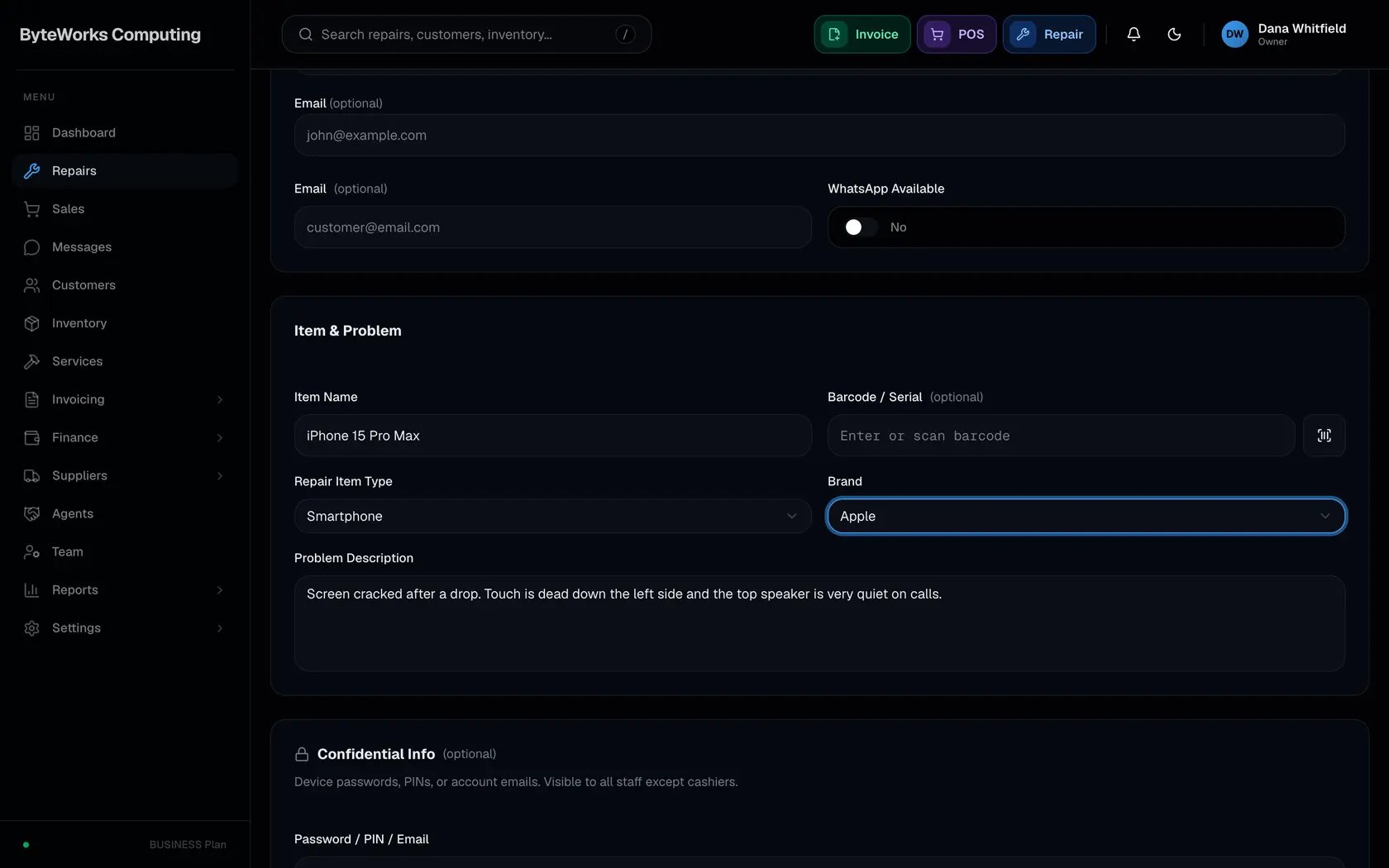
Book the repair in
One form covers the customer, the device and what is wrong with it. Fixmo gives the job its own code the moment you save. That code goes on the ticket, on every document you print and on the page the customer opens.
Walk-in, pickup or on-site, so the form matches how the job arrived
The customer can be a person or a company, new or already on file
Device type and brand come from lists you keep yourself
The fault in the customer's words, with your own note beside it
Take a deposit at the counter, as a fixed amount or a percentage
Assign a technician now, or leave it and assign later
Up to five photos of the device in the state it came in
Move it through the stages
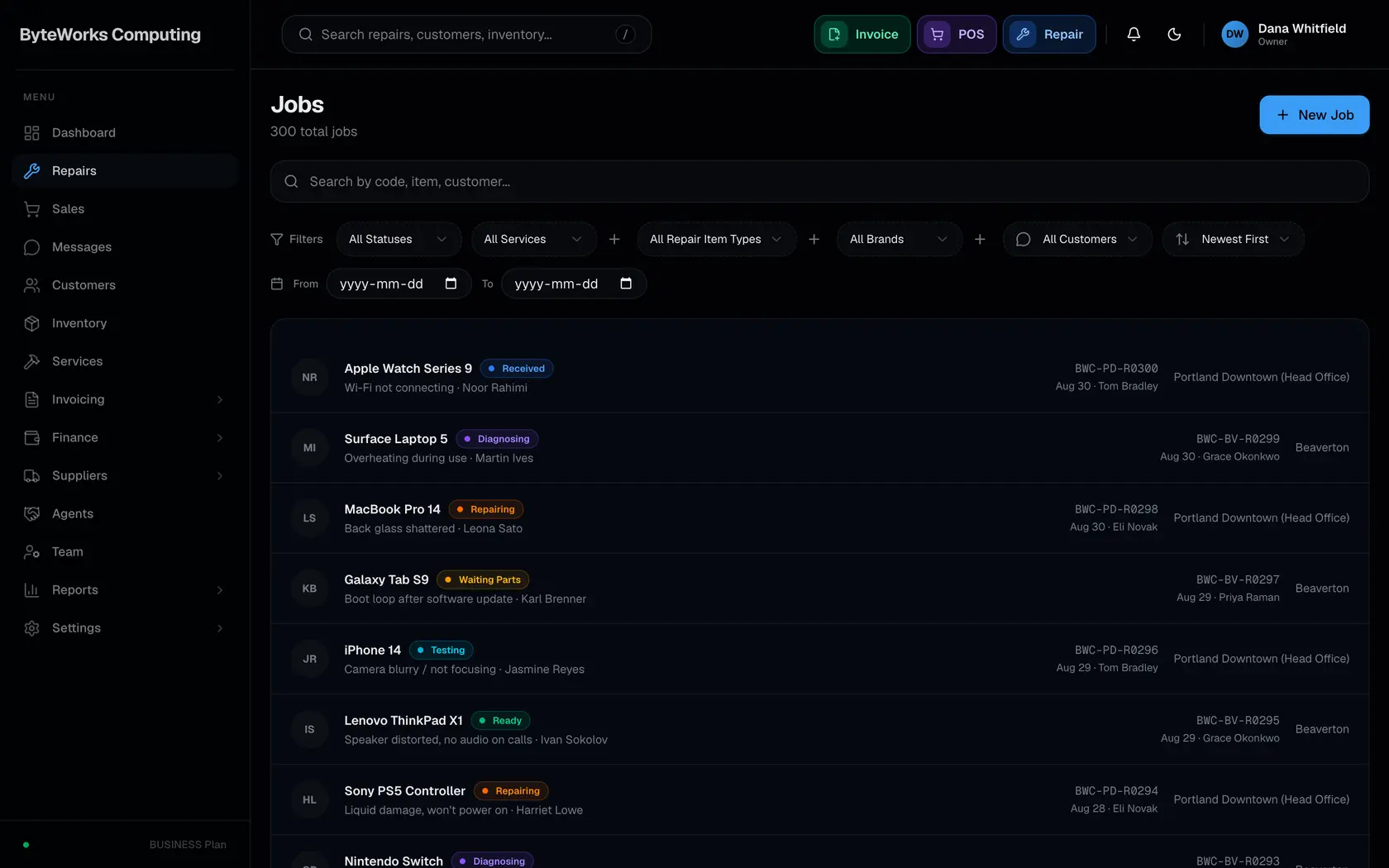
Every repair sits in one of eight stages, from Received to Delivered. Moving it on takes one action. Fixmo records who moved it and when, so a week later you can still see what happened and in what order.
Received, Diagnosing, Waiting for Parts, Repairing, Testing, Ready, Delivered, Cancelled
Every change saved with the name of the person and the time
Filter the list by stage, technician, brand, customer or date
Search by job code, item or customer name
A branch sees its own jobs, head office sees all of them
A stage can be reversed, and the reversal is recorded too
Notes added along the way stay with the job
Quote it before you start
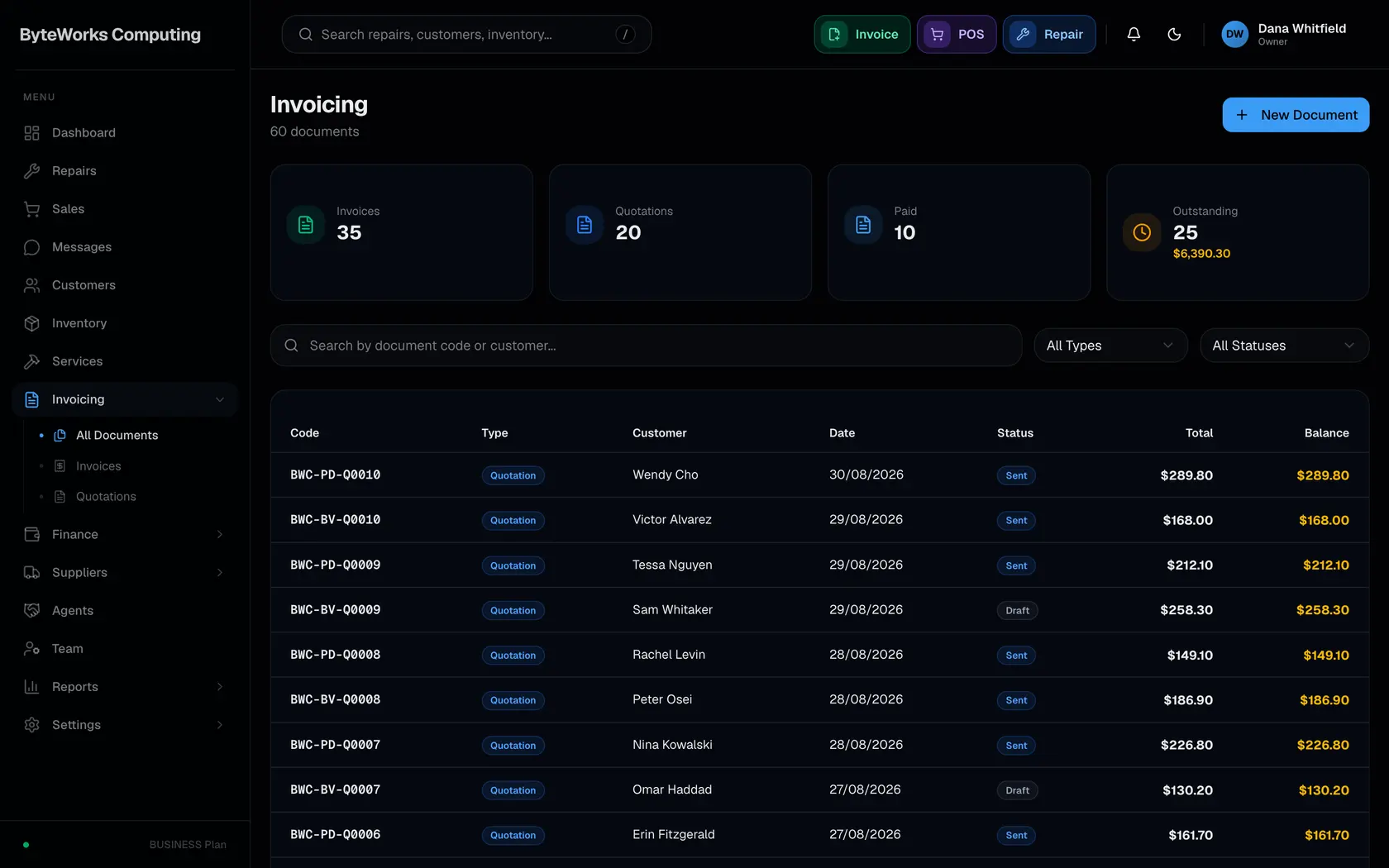
Some jobs need a price agreed before any work begins. Send a quotation, and when the customer says yes it becomes the invoice instead of being typed out a second time. You can see when they opened it.
Quotations, invoices, credit notes and receipts, all from one record
Offer up to three tiers on one quotation, good, better and best
Follow it from draft to sent, viewed, approved or rejected
An approved quotation converts straight into an invoice
Send it by WhatsApp or email, or hand over a printed copy
Part paid and fully paid tracked on the document itself
Every edit recorded against the person who made it
Order and receive stock
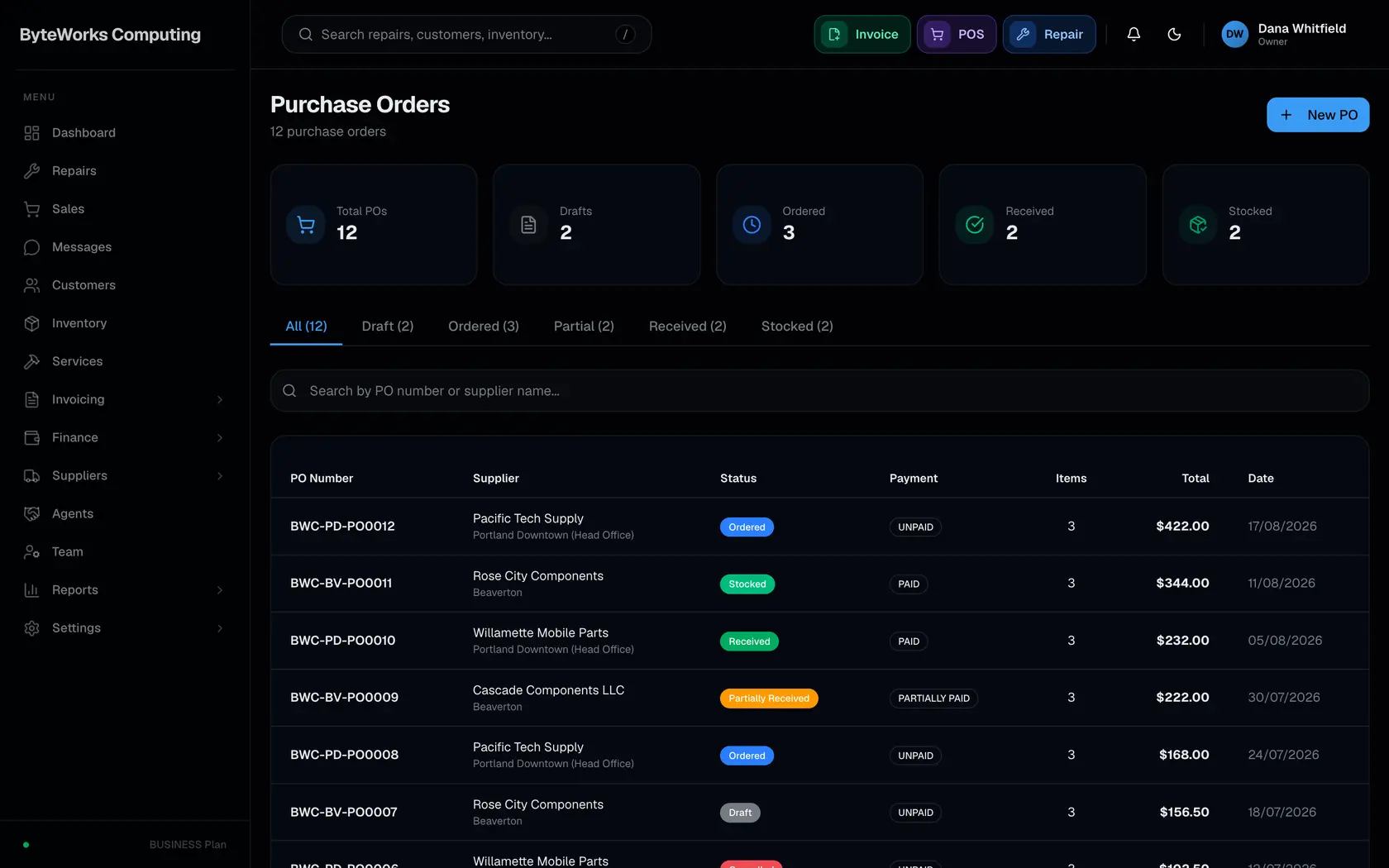
Parts for repairs and stock for the counter are one inventory, so both draw down the same number. A purchase order runs from draft to stocked, and you can receive it in pieces as the supplier sends them.
Raise it against a supplier, on terms from cash on delivery to net 60
Receive it in full, or part now and the rest when it arrives
Stock lands in the branch that ordered it, not in a shared pool
Paying is tracked apart from receiving, as unpaid, part paid or paid
Serial numbers captured as the stock comes in
A warning before a part runs out, not after
One item can be a repair part, a counter product, or both
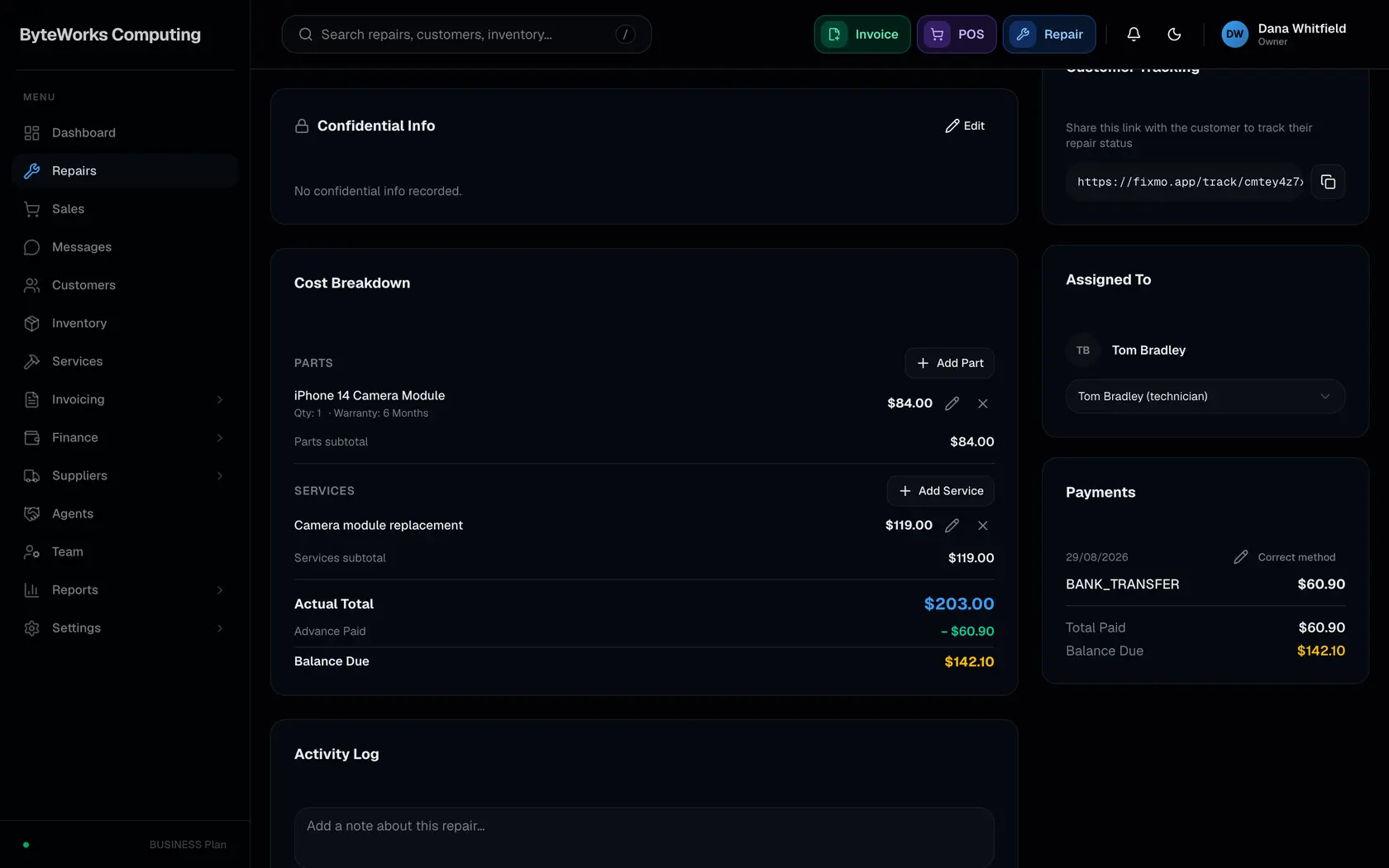
Record what the job took
Parts and labour attach to the job as they are used. The ticket adds itself up from them, so the figure the customer pays is what the work came to rather than a number somebody typed in at the end.
Services priced from your own catalogue, adjusted per job when needed
Parts costed at what you paid, not at the shelf price
Serial numbers tied to the repair they went into
A warranty on the work, set in days, months or years
Photos of the work as well as of the device
Notes only your staff can see, kept off the customer's copy
Every part, service and price change kept in the job's history
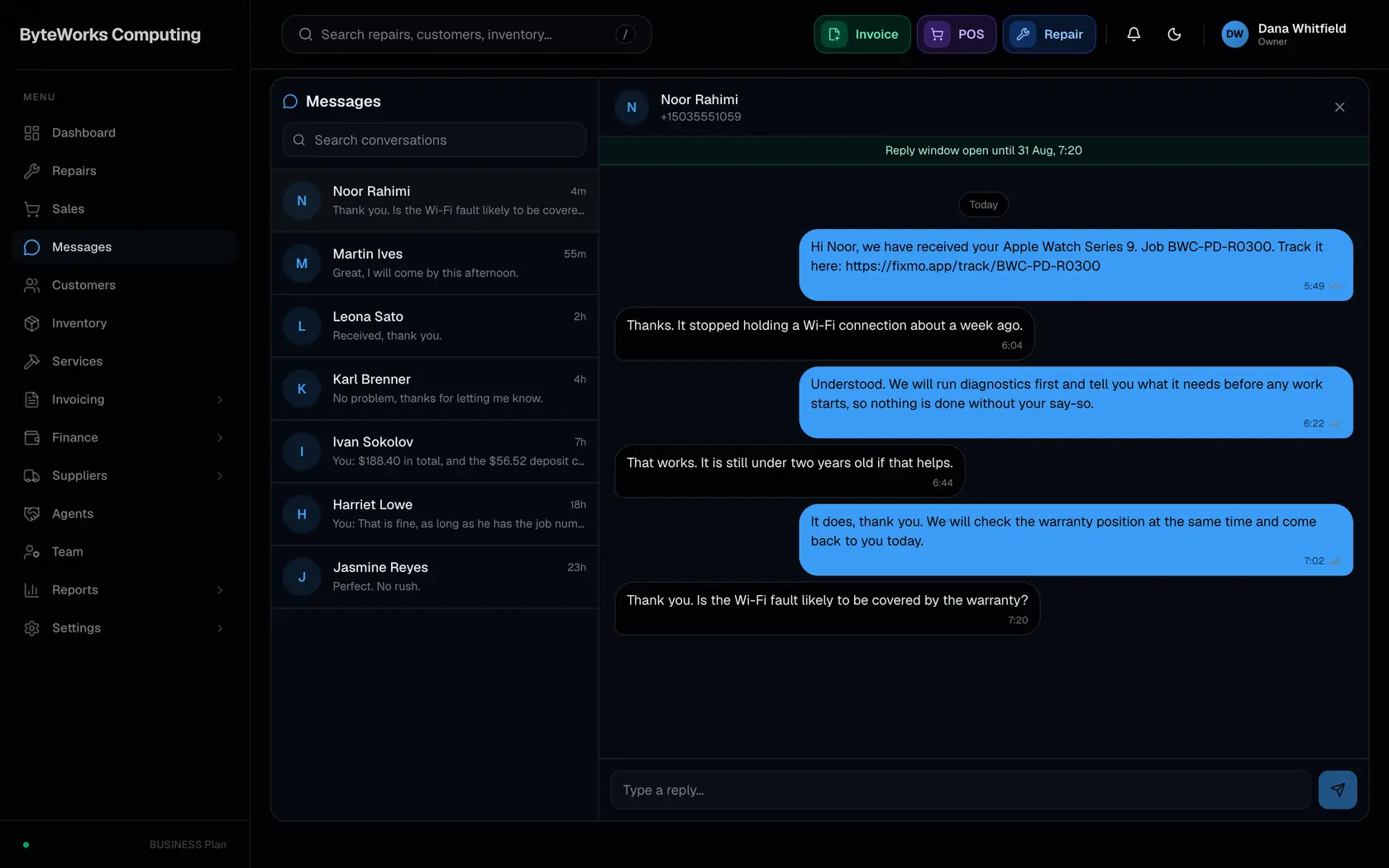
Tell the customer
When a repair changes stage, Fixmo can send the customer a WhatsApp message or an email. You decide which stages send and which stay quiet, and the two channels are set separately from each other.
A separate switch for each stage, on WhatsApp and on email
The tracking page opens from a link, with no login and no app
Every message logged as sent, delivered, read or failed
Replies come back into Messages instead of a personal phone
Email can go from your own domain once it is verified
Receipts and documents can go out the same way
Nothing sends until you connect a channel, so a new shop starts quiet
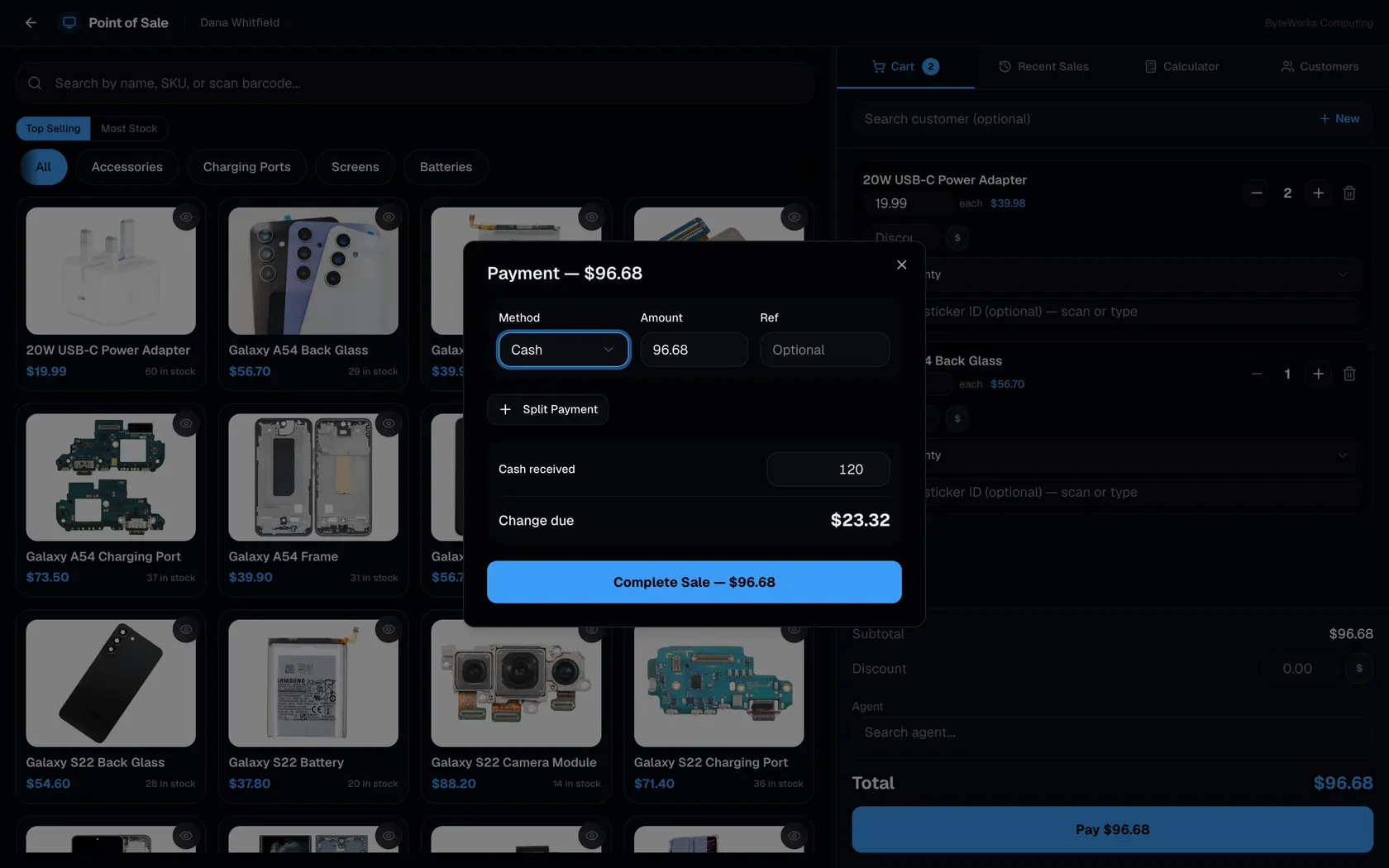
Take the balance
Cash, card, bank transfer or online, and one repair can be settled with more than one of them. Any deposit already taken comes off the balance first, so you only ask the customer for what is left.
Enter the cash handed over and Fixmo works out the change
Split one balance across several methods on one screen
Add your own payment methods beside the four built in
Each payment lands in the account you name, so the drawer balances
A receipt by WhatsApp, by email or printed
Refunds in full or in part, with the reason kept
An exchange when a customer swaps an item, approved by a manager
See what the day did
Nothing needs adding up at close, because every job, sale and payment was entered once as it happened. The reports read straight from that, for today on its own or for any period you choose.
Takings split between repair jobs and counter sales
A daily Z-report for cashing up at the end of the day
Technician performance, turnaround time and job throughput
Stock, customers and price overrides each on their own page
Expenses beside takings, so the figure is what the shop kept
One branch on its own, or every branch together
Any of it exported to CSV

Ask it what happened, and it reads the job itself
The assistant answers from your own repairs, stock, invoices and takings, not just from a help page. It can read every part of the shop and change none of it.

What it replaces
The books, the sheets and the whiteboard
Most shops already run on something. A job book printed in duplicate, a stock sheet, a receipt pad, and one person who remembers the rest. None of it is wrong. It just does not add up at the end of the month, and it cannot tell a customer where their phone is.
- The job book
Everything about one job in one place, from the form at the counter to the link the customer follows while you work on it.
- The stock sheet
The bench and the counter draw down the same numbers, branch by branch, and a serial stays with the unit it arrived on.
- The receipt book
Every document a job produces comes off the same record, and the money can arrive in more than one way.
- The supplier file
What you ordered, what actually turned up, and what it cost you, kept apart from each other because they happen apart.
- The cash box
Takings, expenses and the owner's own money kept in separate places, so the month adds up without anyone reconstructing it.
- The keys to everything
Who can do what, decided per person rather than per job title, and a record of the changes worth knowing about afterwards.
The free plan takes 30 repairs a month and holds 50 stock items.
Eight stages, and the customer sees every one
They open a link and watch the job move from Received to Delivered. No login, no app, and no phone call asking whether it is ready.

Plans
Three plans, and the free one is not a trial
Free stays free. It takes 30 repairs a month and holds 50 items, which is a real week of work for a one person shop, and nothing switches off after fourteen days. Move up when the shop outgrows it, not when a countdown ends.
Enough to run a small shop, not a trial that expires.
30 repairs a month
50 items in stock
One branch, one person
Thirty days of history
For a shop with a bench, a counter and staff on both.
500 repairs a month
2,000 items in stock
Eight people: you, a manager, five technicians and a cashier
Quotations and invoices with no monthly cap
For more than one shop, reporting as one business.
Repairs and sales with no cap
Stock with no cap
Up to fifteen branches
Ten managers, and technicians without a limit
Prices are in US dollars and exclude any tax your country adds. Paying yearly is charged once, at $192 for Pro and $420 for Business.
Book the first repair in today
Nothing to install and no card to start. Open the free plan, put one real job through it at the counter, and see whether the ticket adds up the way you would have written it by hand.
30 repairs a month, free. No credit card.
- One stock list
Drawn down by the bench and the counter alike.
- An assistant that reads the shop
Your own repairs, stock and takings. It changes nothing.
- Eight stages, followed from a link
No login and no app for the customer.